Monday, June 29, 2020

Seasonal Marketing - Utilizing What Every Season Has to Offer


Weston Seasonal & Holidays | Weston, MA PatchSeasonal Offers - Are they worth promoting for??

  • Let’s take a look at statistics:
  • In 2016, U.S. and UK online retailers alike saw their traffic explode on Black Friday, with 220% more sessions than a normal day. With significant discounts, Black Friday sales totaled $3.34 billion spent online (a 21.6% increase year over year)
  • Cyber Monday sales in 2016 also smashed records, bringing in $3.25 billion and a 155% traffic boom to become the biggest day in the history of U.S. ecommerce
  • Shopify merchants saw 3+% more orders than usual over BFCM weekend in 2016, and at its peak, the Shopify platform processed a whopping $555,716 in transactions in a single minute
  • Additionally, research shows that more than 50% of holiday shoppers start researching gift ideas in October or earlier, so it’s important to plan ahead and start your holiday campaigns early

Promote the ‘Special Offers’ Online:
SEASONAL DEALS KNOW_HOW
Every season has something different to offer for a traveler – So. we definitely need to take advantage of these opportunities
Spring, summer, winter and fall are more than just seasons, they're opportunities for businesses to thrive.
With each season comes unique holidays, events and activities, which cause OTA’s to behave differently.
Good business knows that customers respond best to brands that reach out to them in a meaningful way. The trick comes in figuring out the winning combination of content, timing, and method of delivery that makes the engagement mean something. One of the most important factors in that equation is seasonality, or “the tendency of consumer expenditure on a good or services to vary in some pattern over the course of a year” (Ideas in Marketing, Kubacki 2013) 

WHY PROMOTE SEASONAL DEALS??
The significance of these seasonal promotions is to attract attention to the business at an opportune time and increase revenue in an otherwise quiet period. In some cases, these seasons are critical to revenue because they represent a time when a substantial amount of sales takes place. Additionally, increasing interest at unique times of the year offers you various chances of converting one-time customers into loyal patrons. You can provide an experience that is memorable to consumers, boosting your brand and delivering quality results.

Long term Vs. Short term seasonal offers
Long term, as the name suggests is created for special promotions, offers & deals around an ongoing/ long-lasting seasonal event. Short term is best for one-off &/or fast-ending events that happen during a season. 
Long term offer is all about building relationships & using subtle low risk campaigns to do so but a short-term marketing can afford to be more heavy handed and in customer’s face, as they have less time to engage people before losing novelty or relevance.


As the Seasons Turn, Turn, Turn: Seasonal Sales Strategies for Online Stores

Promote Your ‘Special Offers’ Online - A strategic approach can be to build out a calendar of observances that are relevant to your industry in advance. Regardless of what works best for you, adjusting your strategy accordingly is an important step in fostering long-term relationships with your loyal customer base.


Are you geared up for the seasonal treat??


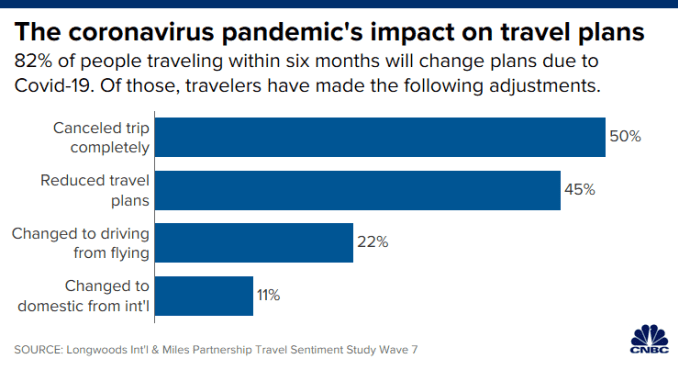
Has COVID-19 changed the way you will travel?

I remember going to my hometown on every holiday as it took only 4 hours by trains and 1 hr by air. Also, when you have a kid with you these does of transport become easy. But since the COVID epidemic, things have changed a lot. The common modes of transport like - air/ rail or cabs look bit challenging when going with a kid - who understand no hygiene norms and can touch anything making the trip difficult till it ends.
As the world faces this epidemic, most of the airlines and Govt. organizations have made hygienic as #1 factor for traveling. Diff. initiatives have been take to ensure safe journey for travels. But the question remains are travelers actually feeling safe while traveling?


There have been a lot of new trends adopted by airlines or hotels to help ensure safe travels:

  • IOT has been utilized to help us in these critical times. Use of robots at airports for thermal screening has been observed, seamless integration with reservations systems & camera vision. The physical contact has been reduced and online web check-in, self baggage drops / abrading passes, baggage info via SMS are the ‘new’ norms for today’s travel
  • Apps like Aarogya Setu have to be enabled by passengers to ensure they are safe while traveling. Also, the traditional methods seem gone with new measures being tested
  • Health checks are conducted, social distancing, PPE / hygienic kits are provided at boarding, in flight sanitation & sanitizers are here to stay.
  • Regular use of masks to prevent virus spread will be a continuous practice for a longer period
  • Blocking middle seats have been done by most of the USA airlines like Delta, American Airlines or United Airlines to maintain social distancing
  • Flexible booking option has also been introduces to entrust travelers in buying air tickets
  • Also, Hotels have added hygienic measures to ensure safety of travelers by providing cleanliness measures, sanitizers, thermal checks, additional room cleaning services etc.
  • Though the corrective measures have been taken but it looks that domestic travel will stay against international travel for a year or so
  • According to a U.S. Travel Association survey, people feel more comfortable traveling in personal vehicles & staying in vacation rentals than they do taking flights or cruises & staying in hotels.
  • These all considerations have also highly impacted the economies and business across the travelers industry - enhancing layoffs and lower budget availability with travelers
Hence, it will be also important to observe if people would like to travel and when in midst of lower salaries or economical budget constraints.


Tuesday, June 26, 2018

Travelers now prefer travel apps to web for search and booking

What exactly do we mean when we say mobile?

Up until recently “mobile” really meant either mobile apps, found in places like the App Store, or mobile web, accessible via URLs. What we see now is that travelers are increasingly turning to the app experience, rather than mobile web, to search and book flights and accommodation.
A global study Travelport Digital carried out with 955 end travelers showed that 58% of people prefer apps to search for flights and 53% preferred apps to find accommodation. We found that consumers want a lightning-fast mobile experience, which they feel this is best delivered through apps. Travelers also value the additional functionality and features that the native platforms bring.
Travel brands that can match their app experience to consumer expectations will drive more bookings, add more ancillaries and create longer-term value. And those travel brands that don’t deliver will suffer through online cart-abandonment, as well a pummeling on social media and app store ratings.

Reasons travelers prefer apps versus web

The findings revealed that apps remain the ‘go to’ for traveler engagement. In many respects, native apps are the preferred channel over web due to their speed, additional functionality, and better overall UX.
Rather than showing signs of ‘app fatigue’ now seen in other industries, travel apps are continuing their growth in downloads and monthly active users. 82% of travelers we questioned said they will be downloading the same number or more travel apps than they did the previous year.
Downloading an app vs using mobile web

App functionality that travelers value


Due to the advantages of speed and UX, travelers download and use apps to search and book travel. 35% also like the immediacy of push notifications that keep them up to date, while almost a third of travelers use apps for promotions or discounts in travel.
For 24% of travelers, loyalty features, like automatic log-in, trip details, air miles, and account/payment details are important.

Travel activities preferred via apps and web

When it comes to check-in and boarding passes it doesn’t come as much of a surprise that apps are the favourite choice but things start to get interesting when you compare apps and web for travel search and booking. 58% of people prefer to use apps for searching for flights and 53% prefer apps to search accommodation, with a close run race for who wins out for booking.
Web, on the other hand, wins out being the preferred choice when it comes to car rental and destination bookings.

Push notifications offer a mix of opportunities to delight and monetize

Further insights revealed that the power of push notifications are not waning with travelers finding trip specific push notifications and promotional offers useful. Today, travel push notifications are mainly delivered via native apps and the mobile web does not offer that level of engagement with consumers.
In fact, mobile apps are increasingly being viewed as engagement platforms, given their ability to interact with consumers throughout the trip. These engagement points vary, from prompting them to book via a discounted offer to notifying them of delays or gate changes, sending contextual at-destination information and driving usage post-booking with loyalty updates.

Great UX = Great loyalty. Bad UX = Bad loyalty

Customers these days are extremely savvy. So it’s important to note that any old mobile experience won’t do — having a 1- or 2-star rated app is basically a death sentence for an app.
Travelers value UX highly: 85% say they would be more likely to book a trip with a brand that had a good user experience. Conversely, if they had a bad app experience, 69% would be unlikely to book with that brand again.

Travel brands investment in mobile makes sense

We wanted to see how travel brands we’re responding to the shift to mobile and apps, so we interviewed 55 senior travel industry professionals to gauge their plans for 2018.
90% of those we spoke to said they were investing in mobile this year and 60% of travel brands are looking to enhance or replace their app this year.

Travelers are spending more time and more money on apps. They have come to expect a fast, frictionless, helpful experience when they search and book their travel when they prepare to take off, when they’re in destination and when they return home.

More story here

Airport shopping app introduced to deliver shopping & food to passengers at their gates

As the airport shopping gets more convenient with mobile payments, ‘AtYourGate’ (AtYourGate was the first innovation to come out of SAN’s Innovation Lab which is tasked with creating new ideas to enhance the passenger experience that can be implemented at the airport and beyond to other airports, malls, hotels and convention centers) and mobile ordering platform ‘Golo' have partnered to introduce a new airport shopping app that delivers shopping and food to passengers at their gates at San Diego International Airport (SAN).
The app aims to raise the bar on passenger satisfaction for both - airport consumers and retailers, by directly embracing new technologies that push the envelope.
As per Jean Francois, CEO of Golo, “Consumers and merchants today expect a frictionless and sophisticated retail experience when making purchases or selling using their mobile technology. They want to see the products accompanied by visually rich images, in a smooth app where searching is intuitive and there is a secure way to transact.”

2 live examples of such innovation include:

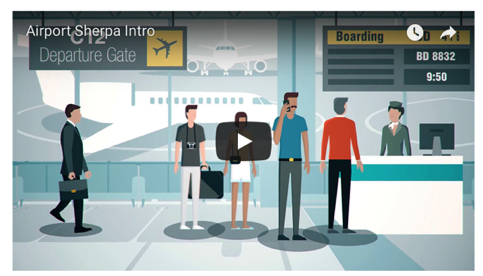
Airport Sherpa, that is a gate delivery service app, which is currently live at Baltimore Washington International Airport. The app keeps track of passengers’ flight schedule to ensure the goods get to the right gate even if there are flight changes, and includes a live order update feature to reassure buyers their goods are coming.  (This ideation can be tested in Hackathon!!)


Grab introduced convenient app-based airport shopping in 2015, with a consumer app as well as an open platform for airport and concessions integrations. It has grown to offer food and beverage pre-order and pick-up services at 24 airport locations in the US and UK. Grab recently signed an agreement with Air Canada to integrate Grab within the airline’s mobile app offering services from restaurant and retail partner concessionaires. Grab also partnered with LevelUp this February to boost mobile engagement in the US.

What Booking a 'Mistake Fare' Really Means | The risks and rewards of buying that really, really low-priced flight!!

Flight pricing errors are a godsend for wanderlust’s with big dreams, but small wallets. It's like an opening that crinkly take-out bag, and realizing you got an extra set of fries with your order 😊 . Believe it or not, airline pricing mistakes happen all the time. Here are few of them:

* 2007: San Francisco to Auckland, New Zealand return, business class – $1,500 USD instead of $15,000 USD. The cause? Human error resulted in a missed zero – oops.
* 2012: Myanmar to the US, return – $300 USD. How come? A mistake when converting the price between currencies.
* 2013: Various US cities to Hawaii, return – $7 USD. Why? A computer glitch that lasted 2 hours messed up the price.

But what rights do travelers like these who have booked a mistake fare actually have? In fact, what even is a "mistake fare"? Here's how to find these fares—and make sure you're not left in the lurch after booking. 

Mistake Fares, Decoded
Error fares or airline price glitches, are a HUGELY reduced flight ticket due to a blunder. Various botch-ups can create a mistake like:

  • Human error: Laziness, fatigue, or a case of stubby fingers and a small keyboard can cause numbers to be omitted or added in error when entering a flight price, resulting in a seriously reduced ticket.
  • Currency conversion misfortunes: Calculating a rate from one currency to another poses a huge risk for miscalculations. A famous example is a $4,000 United Airlines ticket that was listed for just $79 – allegedly due to a mishap when converting the Danish Kroner to the British Pound.
  • Omitting fuel surcharges & fees: Fuel surcharges were first created in the 70's during the oil crisis to accommodate fluctuating prices. Annoyingly, they were kept ever since – supposedly partly to prevent frequent flyer programs from allowing people to book 100% free tickets using miles (you must always still pay these additional fees). Every now and then though, these charges may be dropped by mistake. Fuel surcharges make up a surprising percentage of an airline ticket, so if left out, it equates to big savings!

Statistically speaking, error fares are foreseeable. With the profusion of flights and traditional flight booking systems out there, mistakes will happen and they will be overlooked. It is far too time-consuming and costly for airlines to continually correct every single price conflict.


Things to know before you book
DOT used to make all airlines honor mistake fares, but that all changed in 2015, when a first-class ticket on an United Airlines flight to Denmark cost just $51 if you marked that you were in Denmark in your billing address. The error curtailed from a currency conversion mistake. Though DOT's policy is to keep airlines from jacking up flight prices after travelers had booked a ticket, the transportation agency ruled in this case not to enforce it, since the passengers who booked the flight had done so "in bad faith," lying about their address to book a lower fare. Because of this, since May 2015, airlines have been able to cancel tickets booked on error fares at will, as long as they can prove to the DOT that the ultra-low fare truly was a mistake, usually by comparing the prices between a standard fare and the error fare. Few of the airlines also provide an advisory message , to be sure of the price – for instance, American Airline’s contract states: "If we sell a fare in error, we have the right to cancel the ticket. This includes fare errors, computer errors, and third-party errors (human or computer). We make every effort to prevent, detect and correct errors as soon as possible. When we issue a mistaken fare, we'll void the ticket, give a full refund and notify you within: 72 hours after we learn of the mistaken fare [or] at least 24 hours before departure if you bought the ticket less than 72 hours before departure."

How can I find mistake fares?
The easiest way here is to stalk the experts. Secret Flying is arguably the best resource out there for worldwide flight pricing errors. Each day they scrape up current mistake fares (in mysterious ways), and are prompt with updating when tickets sell out or become defunct. Airfarewatchdog, or The Flight Deal to find these deals. The other option is to set up flight alerts on Google Flights or Hopper for a variety of routes you'd want to fly.
The gray area here is whether or not a low fare is a good deal (which the airline can't backpedal on) or a mistake (which they can). Though a fare may be low because of lack of demand or increased inventory, there is one way to know for sure the deal isn't a mistake fare.


What to Do If Your Ticket Gets Canceled
The DOT requires the airline to reimburse you for all of your non-refundable purchases, including, but not limited to, "hotel reservations, destination tour packages or activities, cancellation fees for non-refundable connecting air travel and visa or other international travel fees." Make sure to keep receipts on hand for any of the purchases you do make, as the airline will likely require proof of purchase. That said, reimbursement is such a hassle that it's worth it to wait to book those non-refundable charges until you have a booking reference or passenger number record to make those purchases.

Monday, June 8, 2015

Learn About Apple Watch


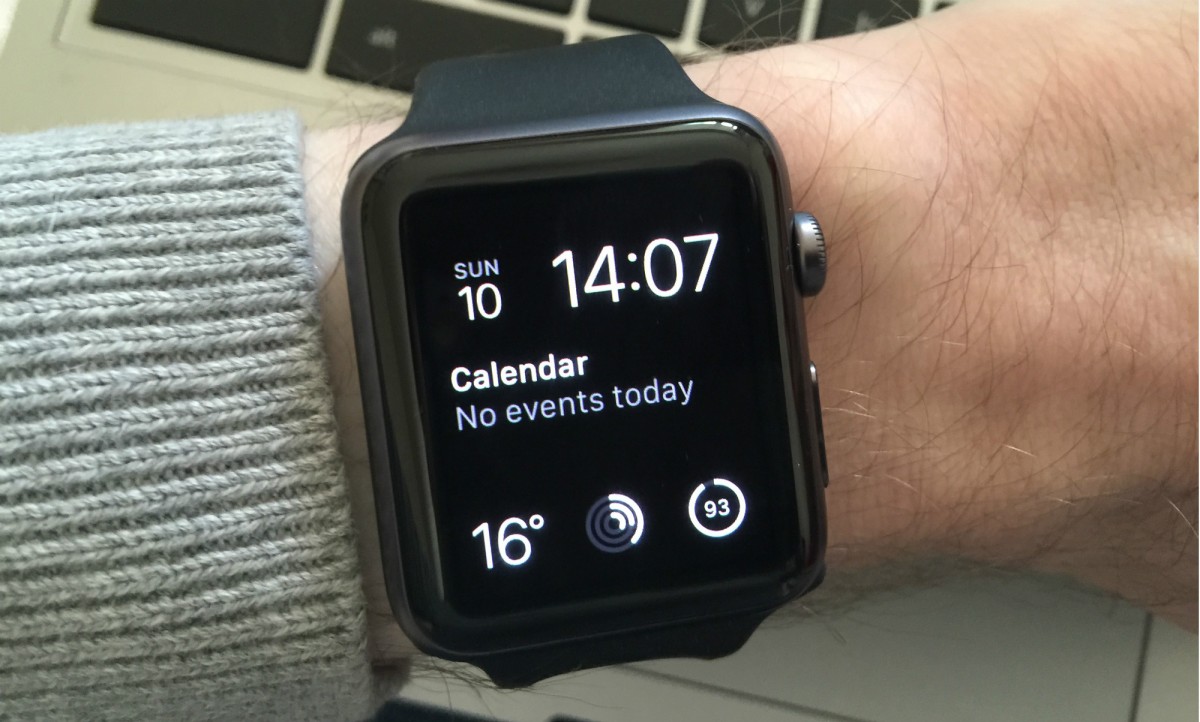
A device you wear is vastly different from one you keep on a desk or carry in your pocket. It’s more than a tool. It’s a very personal expression. There are three distinctive collections to help a user find the watch that’s right for them.


Apple Watch: Features


More immediate, intimate ways to connect - You won’t just see and respond to messages, calls, and notifications easily and intuitively. You’ll actually feel them. With Apple Watch, every exchange is less about reading words on a screen. And more about making a genuine connection.

Stay closer to the people you care about - Now your inner circle is always nearby. Press the button next to the Digital Crown to access Friends, a place where you’ll see thumbnails of those you like to stay in touch with most. Tap one to send a message, make a call, or reach out in one of the new ways only Apple Watch makes possible.


Messages, calls, and mail tailored for your wrist - Apple Watch adds a new dimension to the way you communicate. In just a glance it shows you who’s contacting you. It even gets your attention the way another person would — by tapping you. There are subtle audio cues, too. The experience is discreet and nuanced, with different types of notifications having their own unique character.

Start an entirely new kind of conversation - You don’t even have to use words. The Digital Touch features on Apple Watch give you fun, spontaneous ways to connect with other Apple Watch wearers, wrist to wrist.

Made to measure all the ways you move - Apple Watch unites the capabilities of an all-day fitness tracker and a highly advanced sports watch in one device you can wear all the time. It can track a wider variety of activities because it’s able to collect more types of data. It uses an accelerometer to measure your total body movement. It has a custom sensor that can measure intensity by tracking your heart rate. And it uses the GPS and Wi‑Fi in your iPhone to track how far you’ve moved. 

Activity App - The Activity app on Apple Watch provides a simple and powerful graphic of your daily activity, with three rings telling you everything you need to know. The Move ring shows how many calories you’ve burned. The Exercise ring shows how many minutes of brisk activity you’ve done. And the Stand ring shows how often you’ve stood up to take a break from sitting. The goal? Sit less, move more, and get some exercise by completing each ring every day.


Workout App - Whenever you’re doing a dedicated cardio workout, use the Workout app built into Apple Watch. It shows real-time stats such as time, distance, calories, and pace. It lets you set goals for each workout, encourages you to meet or beat those goals along the way, and gives you a summary of what you’ve achieved. And your workout is included in your Activity app measurements for the day.

Track your progress over time on iPhone - Apple Watch lets you see your daily activity at a glance. To see your progress and trends over longer periods of time, there’s Fitness - an Apple Watch companion app on your iPhone. You can view your activity history, workouts, and achievements by the day, the week, and the month. And it’s easy to zoom in on the details to see just how far you’ve come. There’s also a Health app on iPhone that allows you to share your activity and workout data with your favorite third-party health and fitness apps.

Your wallet. Without the wallet. - Apple Pay is a more convenient, secure way to pay using just your Apple Watch. Now you can buy coffee, groceries, and more right from your wrist. With a simple setup, you can use your credit and debit cards at hundreds of thousands of U.S. locations, with more to come.


Start on Apple Watch. Continue on iPhone - Apple Watch is perfect for quick interactions, but if you need to do something more involved, just pick up your iPhone. The message you were reading or app you were using on Apple Watch will be open and ready to go. Read new mail on Apple Watch, then respond on iPhone. See a sports score or news update on Apple Watch, and read more about it on iPhone.


iOS 8 BOOM

Sneak Peek into iOS 8


Photos -
  1. Search your photo library - Search all the photos and videos on your iPhone, iPad, or iPod touch. Search by the date the photo was taken, location, or album name. Whether you’re at work, on the train, at a restaurant, or on vacation, finding a photo has never been simpler.
  2. Smart composition tools - Even after you take your photo, Photos can automatically straighten horizons and provide the ideal crop.
  3. Get smart suggestions - Just tap the search icon, and you’ll get choices based on what’s important to you. One more tap gives you immediate access to photos taken nearby, photos taken the same time last year, or your all-time favorite photos.
  4. Smart adjustments - Modify the overall light in a photo with a single control. Behind the scenes, Photos intelligently adjusts exposure, brightness, contrast, and more — giving everyone, even the complete novice, great results.
  5. Capture the moment. Then edit it in seconds. - Whatever your skill level, you’ll be able to create photo masterpieces right in the Photos app. Photos can make beautiful edits for you. Or you can take control and fine-tune every aspect of a photo yourself.
  6. A new mode comes to Camera: Time-lapse videos - Capture the experience of the sun setting, a city street bustling, or a flower blooming with the new Time-lapse mode in Camera. The result is a video showing an accelerated sequence of the photos over time. Just set up your device to shoot what you want. Swipe to select Time-lapse mode, tap the Record button, and let Camera record as long as you choose.
  7. Photo filters and editing tools - Make the photo stand out by applying one of the Apple‑designed filters.
Messages

  1. Add your voice to the conversation - Messages in iOS 8 makes it easy to capture any sound — your voice, a song, or a big laugh — and make it part of the conversation. Simply touch and hold the new microphone button to record your message. Then swipe to send it.
  2. Tap to see every attachment from a conversation - It’s simple to browse the photos and videos within a thread. You’ll see all the photos and videos going back to the very first exchange, without having to scroll through earlier messages.
  3. Send a video quickly and easily - The new Messages app lets you share what you’re seeing almost as you’re seeing it. Quickly send a video of your brother’s first time paddleboarding. Or your dad joining the fire dancers at the luau. When you do, you’ve said so much more than “Having fun on our vacation.” And you’ve said it in seconds.
  4. Share your location in the middle of the conversation - “Where are you?” Answer that question more clearly than ever with a map showing your location. You can also share your whereabouts with people you choose for an hour, until the end of the day, or indefinitely. And you can see people in the message thread on a map if they’ve shared their locations.
  5. Take charge of group messages - Start a group conversation and give it a name like “Soccer Team” or “Road Trip.” Easily include who you want, drop who you don’t, and leave the conversation whenever you want. Or turn on Do Not Disturb and then read through the messages when you have time.
  6. Send multiple photos and videos at once - In Messages, tap the camera icon to see the most recent photos in your Camera Roll. Select the ones you want to share and tap Send. It’s that easy. Want to send older photos? Tap Photo Library and select the shots you want.

Details make the experience
  1. Interactive notifications let you stay focused while you stay in touch - Take action on texts, email, calendar invitations, reminders, and even messages from apps like Facebook right from their notification banners — without leaving the app you’re in. Now it’s easy to quickly reply to important messages and keep doing what you were doing.
  2. New time-saving features arrive in Mail - From your inbox, swipe to mark an email as read or flag it for follow-up. You can also easily jump between a draft email and an email in your inbox to gather the information you need to compose your message. And now when Mail recognizes a reservation, flight confirmation, or phone number in an email, a notification appears. Just tap to add an event to your calendar or a phone number to your contacts.
  3. Your favorite Safari features come to iPad - The Tab view you know and love in Safari on iPhone now appears on your iPad. You can see all your open web pages, with tabs from the same site grouped together. There’s also a new Sidebar that slides out to reveal your bookmarks, Reading List, and Shared Links. So you’ll enjoy a familiar browsing experience across all your devices.
  4. A shortcut to who’s important - From any screen, press the Home button twice to see the multitasking interface. At the top, you’ll notice something new: the faces of people you’ve recently talked to and — if you swipe to the right — your favorite contacts as well. Just tap one to call, text, or start a FaceTime call.
iCloud Drive
  1. “How are you?” now has a really accurate answer - Heart rate, calories burned, blood sugar, cholesterol - your health and fitness apps are great at collecting all that data. The new Health app puts that data in one place, accessible with a tap, giving you a clear and current overview of your health. You can also create an emergency card with important health information - for example, your blood type or allergies-that’s available right from your Lock screen. 
  2. Your health and fitness apps will work even harder for you - With HealthKit, developers can make their apps even more useful by allowing them to access your health data, too. And you choose what you want shared. For example, you can allow the data from your blood pressure app to be automatically shared with your doctor. Or allow your nutrition app to tell your fitness apps how many calories you consume each day. When your health and fitness apps work together, they become more powerful. And you might, too.
  3. You are in charge of your data - The Health app lets you keep all your health and fitness information in one place on your device and under your control. The information you generate about yourself is yours to use and share. You decide what information is placed in Health and which apps can access your data through the Health app. When your phone is locked with a passcode or Touch ID, all of your health and fitness data in the Health app is encrypted. You can back up data stored in the Health app to iCloud, where it is encrypted while in transit and at rest. Apps that access HealthKit are required to have a privacy policy, so be sure to review these policies before providing apps with access to your health and fitness data.

Wednesday, January 15, 2014

Apps to deal with Autism


Autism is quite common among children and the parents of such children find it quite difficult to engage themselves with their children. But with the era of mobile apps blooming, mobile apps for autism can help the special children to communicate their basic needs. 


A large variety of intuitive apps, comprise of colorful images & sounds, which can hold the child’s attention long enough to learn & offer effective tools to build vocabulary.

APPS FOR PARENTS

The parents of special kids generally get worried for their kids, if they are out of their sight. Hence, they need a kind of app that 

  • Tracks or records the activities of their children on a timely basis
  • Provides a daily record of the activities undertaken
  • Shows a graph/comparison report of other autism patients too; such that you can see the growth of your child with others
  • Shows the average statistics based on various factors
  • Includes a growth rate to analyze your child’s performance

APPS FOR LEARNING

There are various apps developed these days to ensure that the autistic child expresses himself and gets his needs fulfilled. In most of the cases, the child lacks verbal communication and such apps help them to explain themselves to others.

APPS FOR MONITORING

There are various apps developed to help parents locate their autistic children such that they do not face any trouble.

APPS FOR COLLABORATIONS / SOCIALIZATIONS

The families of people with special needs can collaborate and discuss various problems they are facing and get answers from the people having expertise in that area.

DISCUSSION BOARDS / ONLINE FORUMS APP

These kinds of apps help the parents of autistic children to come up and speak about any problem they are facing with their child and get answers from different parents, who have special kids too.

SOCIAL MEDIA APPS

There are various apps that allow your autistic child to share or raise his own creations in social media websites.

QA APPS

These kind of apps allows video modeling of social skills reinforced by post video Q&A sessions.

WRITING APPS

These apps help the children to learn how to write better in an efficient manner.


Thursday, October 17, 2013

GOOGLE GLASS - LET THE WORLD SEE THROUGH IT!!


Google Glass displays information in a smartphone like hands free format that easily connects with the Internet through regular language voice commands.

FEATURES

Feature
Description
Hands-free 1st person photos & videos
Takes photos & videos-hands free using the headset that inevitably records the footage, when a user simply says - "Ok Glass, record a video".
Google Search Results in your eyes directly
A user can solely ask Google Glass information about everything.
Easy and turn-by-turn Directions
Get instructions right in front of your face with the Google headsets that tell which route a user needs to take.
Voice Translations
It gets easy to tour in a new country & find any hotel or brasseries, as Google Glass can translate their language so that a user does not face any problem.
Voice Dictation & Gesture Control
Reply to any email or edit any message before sending via voice dictation or turning the screen and managing the device using eyes.
3rd Party app-Integration
As per NY Times, Evernote, Path and Skitch would be amalgamating with Google Glass. Hence it will comprise all information related to news, photos, and headlines and get delivered in the eyewear as a notification.
Virtual Reminders
Set a reminder using a visual feature with Google Glass - View an object and tell "Remind me to." and the headset will comrade that object with a photo of the allocated task.

Google Glass
GOOGLE GLASS WORKING MECHANISM

A Google Glass constitutes a CPU, GPS, speakers, microphone, battery etc. that is added to a small projector and a prism that transmits the light on the user's retina. Each of the components is placed inside a frame in a consistent manner. It requires a good mobile broadband signal, to make the device feel light as most of the administering is done in cloud (like it does with Apple’s Siri).


SCOPE OF GOOGLE GLASS IN HEALTHCARE

Meaningful Use for Hospitals - It is quite cumbrous for the hospitals units to dose bar code for every medicine, as they need to know who is the patient sitting in the room, his health problems and then his prescriptions. EMR should include an assistive technology that confirms that the right medication is available to the right patient at a given time. With help of a Google glass, it becomes easy for a nurse to recognize the patient via Wi-Fi geo location that also helps her to scroll through the medication picture and specify whether they were dispensed before.

Clinical Certification - Google Glass helps to present the multifarious clinical documentation with a real time video of the patient meeting, taken from the vantage point of the clinician's Google Glass. Every audio/visual prompt that the clinician sees and hears will be realistically documented.

Emergency Department Dashboards - Google glass assists the physicians working in a high pressure, fast paced environment to quickly access information, filter relevant information and make evidence-based conclusions using visual signals, vital signs, triage details, and treatment certification.

Alerts and Reminders - Google Glass presents those events and issues, which are most grave, requiring action today (alerts) and those issues that are generally good for the wellness of the patient (reminders). Having the benefit of alerts and reminders allows a clinician to get done with what is most important.

Judgment Support - A clinician can retort to a cardiac arrest using Google glass to regain the suitable choice support for the patient in question and visually sees a decision tree that incorporates ideal doses of medications, the EKG of the patient and vital signs.

SEGMENTS THAT CAN GAUGE GOOGLE GLASS

Business Industry - Business apps that are focused on interaction and association could leverage the Glass API to understand all kinds of efficiency augmenting use-cases and applications.

Education Industry - People use YouTube lessons to understand about new things, which has made it clear that education is not just restricted to the classrooms. With Google Glass, it would be possible to record tutorials in any domain like fixing a car engine or machinery parts, or in constrained areas where only the physician and its staff is permitted.

Health Monitor Interface - It is easy to track a user's undertaking with Glass' built-in GPS chip. It can combine external health tracking monitor or other healthcare apps and exhibit, track or log in a user's - pace, speed, heart rate & running period for any use - as in case if a user is running a marathon.

Video Conferencing Substitute - Most of the people today use Google Hangout in order to deal with any sessions or formal chats, but still a user has to sit in front of a laptop in order to use it. But with Google Glass, it is practical to conduct meetings flawlessly. This would be a better substitute for those corporations that have lots of meetings on a consistent basis and can spend a budget on virtual conference rooms.

Corporate Meetings – Google Glass is a great alternate for decision makers who are always on the move and wants a large audience to connect with. Group meetings can be done irrespective of where everyone is.

GOOGLE GLASS: BEST PRACTICES

Confirm that the glassware created is user-friendly by trying it on an actual device.
Do not use too many notifications that can annoy the users.
The user should be provided with suitable controls, such that they can interrelate with Google Glass as and when wanted & ignore it when they don’t want.
If a user slips a timeline item from the service, it should not worsen their experience.
Make sure that the result exhibited is pertinent and novel.
There should be a real time notification system that notifies glassware about certain events.
Avoid user shocking with sudden functionality.
Create well-formatted, reasonable and legible timeline cards, as it is the core way of users interacting with the content on Glass. The timeline cards can be designed in 3 ways: -

·      Text - Text is the easiest form to create stunning and readable cards on Glass. A text can be used if the content that is being displayed contains mainly of text; or if a user wants to choose how to present the content to the user and if a user wants the content to remain stable & up to date.
·      Glass HTML templates - This HTML markup is appropriate if a user needs to send organized content to a user's timeline or control over formatting.  An HTML template is most viable if a user wants to show structured content such as lists or tables or wants a greater flexibility in designing the content.
·      Displaying user customized HTML - If a user wants to use a template that is not just resumed to Glass HTML template, he can do so by creating his own tailored pattern, as it helps him to control how the content is rendered; no doubt, he needs to make sure that it has to be user-friendly.

If a user wants to attach photos/videos, he can do so , but the photos or videos  will appear behind the text associated, only with the difference, that the text would disappear when a video is played.
  
Optimal Statistics: -

Send full screen images and video at a 16x9 aspect ratio.
Target a 640x360 pixel resolution.
Always identify both the height and width of an image. This averts placing reflows around an image as cards render. It also permits Glass to present a well-formatted error message if the image is not accessible.
Keep the period of video clips between 10 and 20 seconds. Glass is a device devised for rapid data consumption; so long videos are usually not suitable for users to ingest.
A user should bundle or paginate content on timeline cards to save space & group similar information. This feature works well with - a thread of emails or short messages, related articles added all at once, a list of key events and score updates for an ongoing sports game. But bundle would not be suitable for - all content from your service, many headlines sent to Glass over the course of a day and several pages of a long article.
The menu card devised should be: -

q If you specify an icon, use a 50x50 pixel image.
q Limit display names to a few words if possible.
q Use the default icon and display name for built-in menu items unless you are using the menu item for something very different.

Deliver a "Welcome" card to the Glass device after a user approves your Glassware. This lets your users know that setup was successful.
Deliver content as it happens, especially if you're generating an audio notification.
Sometimes it's beneficial to deliver content in digest form. If you're sending a digest, it's best to send it mutely.
Contacts appear in full screen, so use a 640 x 360 pixel icon.
Tag content that was created and shared with Glass so that receivers know the source of the content.
Add "Sent through Glass" when classification is not needed. This is often the case for emails.
Glass™ always has a trademark symbol the first time or the most protuberant time it appears in a creative.
Glass is always capitalized and is never plural or possessive.
Glass is never part of the name of your business, Glassware, other products. Instead, use "for Glass." If you use "for Glass" in conjunction with a logo, "for Glass" must be a smaller size than the rest of the logo.
You can use Glass as a descriptor, as long as it is followed by a proper, generic term.
Ensure you and your Glassware obey to the Terms of Service and Developer Policies documents.
Submit your Glassware for analysis by Google team.
Google team will email the user, feedback and next steps explicit to the Glassware.
Ensure your Glassware passes the Launch Checklist. Submitting Glassware that already passes the checklist accelerates the review process.
Screen aspect ratio -16x9
Screen resolution - 640 x 360 pixels
Share contact icon size - 640 x 360 pixels
Menu option icon size - 50 x 50 pixels
Supported media format - Container: MP4
Video: H.264 baseline and H.263 baseline
Audio: AAC and MP3

Google Glass: Limitations

The costs for the glasses are very extreme for an average consumer ($1500-$3000). In April 2012, Google confirmed that the glasses when available to the public will cost between $250-$600.

A Smartphone can drive apps, can be used for gaming reasons, have distinctive variations, huge variety of reasonable price and much more tractability than this Glass.

Those people who already have some concerns with their eyes and wear glasses in their daily routine cannot use Google Glass.

Google Glass cannot be used while driving, as the picture, video or data will be in front of the eyes of the user, which can disturb them.

Recording video on the headset for a longer time can drain its battery in half an hour.

The speaker, which transfers sound through the skull to permit for ambient noise, can be tough to hear in any situation other than a silent room.

Confidentiality issues are a big worry as a person sitting in a restaurant or park wearing Glass, can take anyone's photos or videos without that person's approval.

Glass informs of inward messages by making a “ding” sound through bone transmission, then pouring the notification directly into your right eye, which can be quite frustrating for a user & destroy Glass experience.

The basic frame for Glass is a thin, flexible titanium piece of metal upon which the plastic and nose-bridge parts are joined, which gets easily broken, especially in the comprised Glass pouch.

Seasonal Marketing - Utilizing What Every Season Has to Offer

Seasonal Offers - Are they worth promoting for?? Let’s  take a look  at statistics: In 2016, U.S. and UK online retailers alike saw...